
Reconstructing program execution with ATLANTIS DFIR
Use ATLANTIS Execution Provenance to collect Windows execution artefacts, build a defensible timeline and resolve a suspicious application case.
Why execution provenance matters
When a suspicious binary is discovered, the first question is rarely just “is this file malicious?”. Investigators also need to establish whether it ran, when it ran, which user interacted with it, where it came from and whether the activity spread beyond one endpoint. A file scan can provide a detection signal; execution artefacts provide the surrounding facts needed to make a decision.
ATLANTIS turns that investigation question into a scoped collection plan. The Execution Provenance profile brings together complementary Windows artefacts, preserves the selected scope and returns the results in a reviewable evidence package. The result is a timeline that can be compared with detections, endpoint activity and response actions without switching between disconnected collection tools.
The investigation question
This guide uses an illustrative case. A security team receives an alert for an unsigned executable in a user-writable directory. The alert alone does not prove execution or compromise. The analyst needs to answer four questions:
- Was the binary executed, or was it only downloaded and stored?
- Which account and interaction pattern are associated with the launch?
- Did the execution involve a removable drive, a network location or a policy bypass?
- Are there persistence or follow-on indicators that justify containment?
Demonstration note: The case is intentionally generic. Any hostname, path, timestamp or identifier visible in a product screenshot is demonstration data and must be replaced or redacted before public publication.
Select the right ATLANTIS scope
Choose 04 Execution Provenance when the primary objective is to reconstruct program execution. In the next step, ATLANTIS exposes the Execution Traces category so the analyst can select only the evidence sources required for the case.
The recommended baseline for the illustrative case is the following eight-source collection plan.
| Evidence source | What it can return | How it helps the case | Important interpretation note |
|---|---|---|---|
Program Execution Records (prefetch) | Prefetch file metadata such as executable name, execution count and recent run information where available. | Supports “did it run?” and helps estimate recency and repetition. It can also expose the executable path and referenced runtime components. | Prefetch is not a complete audit log. Absence is not proof that a program never ran; retention, system configuration and file type affect availability. |
Application Compatibility Cache (amcache) | Amcache entries containing file identity, path, publisher/version metadata and installation-related traces. | Corroborates that Windows observed the binary and helps distinguish a newly introduced file from a long-standing installed component. | Amcache is evidence of system knowledge, not a standalone execution verdict. Correlate with other artefacts. |
AppCompat Cache History (shimcache) | Historical compatibility records and exposed file paths. | Adds historical context when the file is no longer present or when execution evidence is incomplete. | Shimcache semantics vary by Windows version and collection state; treat it as supporting evidence. |
Shim Database Artifacts (shimdb) | Application Compatibility database content relevant to compatibility shims and execution-control context. | Helps identify whether a binary was covered by a compatibility database or whether a persistence/hijacking hypothesis deserves review. | A shim entry does not automatically indicate malicious activity. Validate the associated file and configuration. |
Execution Policy State (execpolicy) | Policy settings that influence script execution, administrative control and security-bypass paths. | Explains how a script or unsigned component could execute despite local policy expectations. | Policy state is contextual. Record scope and effective policy rather than inferring intent from one setting. |
Interactive Execution History (userassist) | UserAssist records for user-launched applications and desktop interaction patterns. | Helps connect a launch to an interactive user session and distinguish manual execution from service or scheduled execution. | UserAssist is user-specific and may not cover service, SYSTEM or non-interactive execution. |
Jump List Activity (jumplists) | Recent application and document access paths maintained by supported applications. | Shows which files or documents were opened around the suspicious launch and can reveal a lure, staging directory or follow-on activity. | Jump Lists describe application activity, not necessarily successful execution of the target binary. |
Shortcut Link Artifacts (shortcuts) | LNK metadata including target path, working directory, arguments, timestamps and source volume/network hints. | Can reveal whether the binary was launched from a share, removable media or a user-created shortcut, and can expose command-line context. | A shortcut is a launch mechanism or artefact; validate the target and related timestamps. |
What the collection produces
ATLANTIS does not simply return a folder of raw files. The collection plan records the selected endpoint scope, chosen artefacts, task identity, destination and completion state. The analyst can then review the returned categories and drill into rows, metadata and related evidence.
For an execution investigation, the useful output is a set of corroborating observations rather than one “malicious” label:
- Execution likelihood: Prefetch recency/count, UserAssist interaction and matching LNK metadata.
- File identity: Amcache path, version, publisher, hash or file metadata where available.
- Historical exposure: Shimcache and ShimDB entries for files that may have been moved or deleted.
- Launch context: Shortcut target, arguments, working directory, network/removable-media clues and Jump List access.
- Control context: Effective execution-policy evidence that explains script or administrative behaviour.
- Scope: The same binary, path, publisher or behaviour observed on other selected endpoints.
Reconstructing the illustrative case
The analyst reviews the collected artefacts in a fixed order so the conclusion is repeatable.
1. Establish file identity
Start with Amcache and any available file metadata. Confirm the path, product or publisher fields, version and hash. Compare the identity with the detection record and with the endpoint’s expected software inventory. If the file is absent from disk, retain the Amcache and Shimcache observations as historical evidence and mark the file as unavailable for direct re-analysis.
2. Test whether execution occurred
Use Prefetch as the primary execution-oriented signal, then corroborate with UserAssist and shortcut evidence. A recent Prefetch record plus a matching UserAssist entry is stronger than either artefact alone. A shortcut pointing to the same binary with a recent access time can explain how the launch happened.
3. Recover the launch context
Review LNK target path, working directory and arguments. Jump Lists can show the document or application opened immediately before the binary. If the target or working directory references a share, removable volume or temporary staging location, expand the scope to the relevant network or user-activity artefacts.
4. Check policy and compatibility context
Execution Policy State can explain a script interpreter or administrative bypass that would otherwise look anomalous. Shimcache and ShimDB add historical and compatibility context. These records should be used to test a hypothesis—not to label a file malicious by themselves.
5. Decide whether the case expands
If the evidence aligns around an executed binary, a user or service context and a suspicious origin, link the result to an incident and collect follow-on evidence such as process memory, persistence or network activity. If the artefacts show only download or inventory exposure without execution, document the conclusion and route the file to controlled analysis or allowlisting review as appropriate.
The following Amcache view is one example of the evidence returned by the Execution Provenance profile. ATLANTIS can collect additional supporting artefacts—including Prefetch, UserAssist, Shimcache, Jump Lists and LNK records—within the same investigation plan.
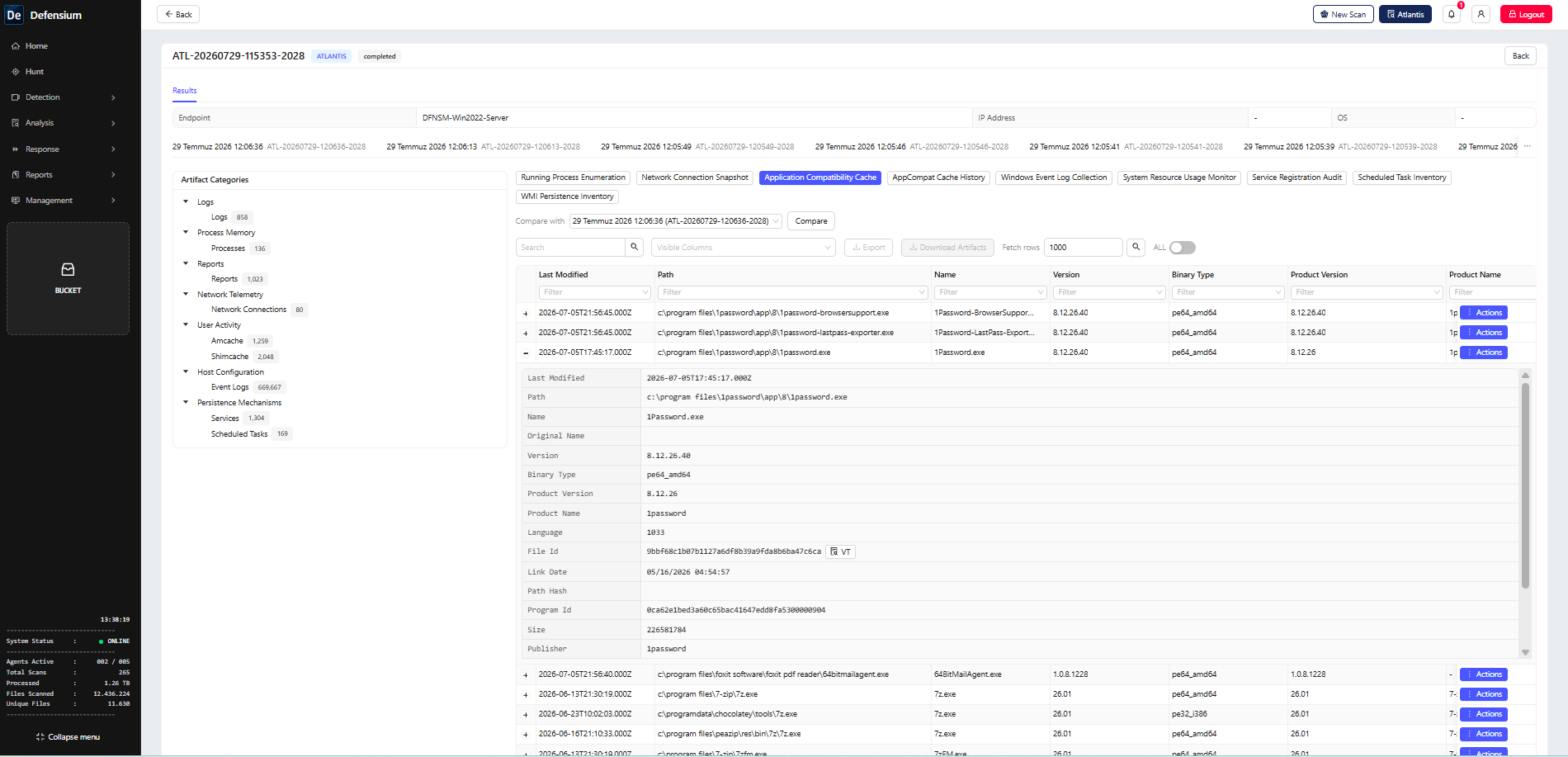
Figure 1 — Example Amcache evidence in ATLANTIS. Amcache is one component of the wider Execution Provenance collection and should be correlated with other available artefacts when determining execution.
What Defensium contributes
ATLANTIS turns execution analysis into a controlled and repeatable workflow. Instead of collecting artefacts through separate tools and reviewing disconnected outputs, analysts can select complementary evidence sources in a single plan, target one endpoint or an authorised endpoint group, monitor the collection task and review the returned evidence within the same investigation context.
Amcache provides application identity and historical system awareness; Prefetch contributes execution-oriented evidence; UserAssist adds interactive-user context; LNK and Jump List records can reveal launch paths and related documents; Shimcache and ShimDB preserve historical and compatibility context; and execution-policy data helps explain how scripts or unsigned components could run.
Together, these sources allow the analyst to move from an isolated detection to a supported assessment of file identity, probable execution, user interaction, origin and investigation scope. Where the evidence indicates higher risk, the result can be handed off to Defensium’s analysis and response capabilities for file analysis, wider endpoint search, additional evidence collection or authorised containment.
The operational contribution is fourfold:
- One plan, multiple evidence sources: Select the complementary execution artefacts together and preserve the investigation question behind the collection.
- Endpoint and group targeting: Apply the same controlled plan to one endpoint or an authorised endpoint group when scope expands.
- Evidence continuity: Keep the selected scope, task identity, collection result and analyst decision together for later review.
- Analysis and authorised response handoff: Use the execution context to guide deeper analysis, additional evidence collection or an approved containment action.
Verification checklist
Before closing the collection task, confirm:
- the intended endpoints were online and included;
- the eight selected sources are present in the collection summary;
- timestamps and time-zone assumptions are documented;
- at least two independent artefacts support any execution conclusion;
- missing or stale artefacts are recorded as limitations;
- the output is linked to the detection or incident record;
- any containment or allowlisting decision has an owner and rationale.
Practical outcome
The value of ATLANTIS Execution Provenance is not a larger pile of artefacts. It is a defensible chain from suspicious file → execution evidence → user and launch context → scope decision → response. ATLANTIS collects complementary evidence that enables analysts to assess execution with greater confidence. No single artefact should automatically be treated as a complete execution verdict.